Zinc guides · Reviewed November 7, 2026
What self-custody means for your Bitcoin wallet.
Understand Bitcoin self-custody with practical Zinc examples: recovery phrases, wallet passwords, watch-only accounts and receiving BTC or Ordinals.
You can reinstall a wallet app. Recovering the wallet depends on having the right recovery material and account setup. Start by separating what receives coins, what authorizes spending and what unlocks this installation.
Self-custody situations
The interactive controls require JavaScript. The complete guide and worked examples remain readable below.
I changed devices: An app login is not your recovery plan.
For a software wallet, check that you have the correct wallet recovery material and any additional passphrase your setup uses. The local Zinc password unlocks an installation; it is not the recovery phrase. A hardware wallet or externally signed setup has its own recovery requirements.
- Use an official installation and its trusted restore flow. Do not enter a recovery phrase into this guide or a support form.
- Check the original layout, network and account. Compare your own receiving information and transaction history before relying on the restored view.
- Keep the original installation until you have checked the intended accounts and assets.
I can see assets but cannot sign: A watch-only profile shows public account data.
Zinc can monitor supported public account information without importing its private signing keys. Seeing a balance or receiving address in that profile does not mean it can authorize a spend.
- Check the selected wallet’s type. The demonstrated wallet list marks the example profile as Watch.
- Locate the software wallet or hardware device that actually controls the relevant keys. Do not try to turn an address or public descriptor into a recovery phrase.
- Treat a public address as receiving information, and a public descriptor as potentially revealing more account activity. Neither is a backup of private spending keys.
BTC appears; inscriptions do not: Check the wallet view before restoring again.
A recovery phrase can lead to different address setups. Separate payment/Ordinals accounts and a unified Taproot account do not present the same receiving information. An incomplete backend sync can also leave the view unsettled.
- Check the selected wallet, account, layout and Bitcoin network against the original setup.
- Check whether syncing and inscription metadata loading have completed. An empty view alone does not prove assets are gone.
- Use the appropriate asset receive/send purpose. Keep the original view while checking; do not move coins just to make two balances match.
I changed my Zinc password: Changing the local password does not replace recovery keys.
The desktop installation password gates local access. Changing it does not change the Bitcoin keys derived from an existing recovery phrase or revoke another copy of that phrase. Device authentication and hardware authorization are separate controls.
- Keep installation credentials distinct from wallet recovery material in your backup plan.
- For a suspected recovery-material compromise, a local password change alone does not restore exclusive control. Assess the affected wallet and assets before any transfer.
- Use a trusted signing flow and review recipients, inscriptions, postage, change and fees. Do not give recovery material to someone offering to fix the problem.
What you actually control
A self-custody Bitcoin wallet lets you authorize spending through keys you control, rather than asking a custodial service to release an account balance. The wallet interface helps you prepare and review transactions; Bitcoin outputs and their spending conditions determine what a valid spend requires.
For a phrase-based software wallet, the recovery phrase represents key material. Protect it separately from the application’s local unlock credentials. If your wallet setup uses an additional passphrase, the phrase alone may not recreate the same wallet. Hardware and other signing arrangements require their own backup plan.
| Item | What it does | What to remember |
|---|---|---|
| Receiving address | Gives a sender receiving information for Bitcoin outputs. | Public, but sharing or reusing it can reveal linkable activity. It is not a spending key. |
| Private key | Can help satisfy a particular output’s signature requirement. | Secret. One private key is not necessarily a backup of every account in a wallet. |
| Recovery phrase | Represents key material used to derive a phrase-based wallet. | Secret. Keep the correct phrase and any additional passphrase your setup requires. |
| Zinc desktop password | Unlocks local installation access. | Not a replacement for wallet recovery material. A password change does not revoke an exposed recovery phrase. |
| Account setup | Identifies the network, layout and account you used. | Useful recovery context. Public descriptors can expose account history; handle them with privacy in mind. |
Five things that are easy to confuse
- Receiving address
- What it doesGives a sender receiving information for Bitcoin outputs.
- What to rememberPublic, but sharing or reusing it can reveal linkable activity. It is not a spending key.
- Private key
- What it doesCan help satisfy a particular output’s signature requirement.
- What to rememberSecret. One private key is not necessarily a backup of every account in a wallet.
- Recovery phrase
- What it doesRepresents key material used to derive a phrase-based wallet.
- What to rememberSecret. Keep the correct phrase and any additional passphrase your setup requires.
- Zinc desktop password
- What it doesUnlocks local installation access.
- What to rememberNot a replacement for wallet recovery material. A password change does not revoke an exposed recovery phrase.
- Account setup
- What it doesIdentifies the network, layout and account you used.
- What to rememberUseful recovery context. Public descriptors can expose account history; handle them with privacy in mind.
Zinc example: the wallet you can watch but cannot sign with
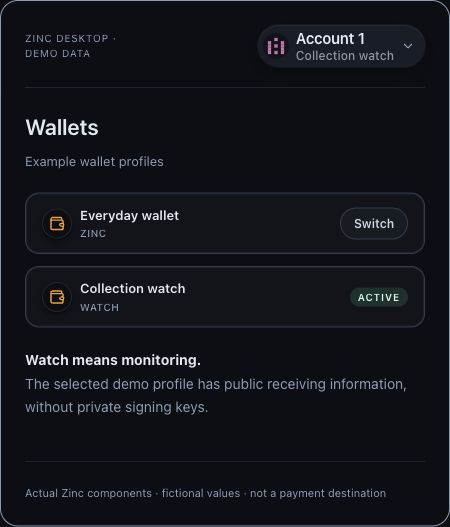
In the example below, Everyday wallet and Collection watch are fictional profile names. Collection watch is selected and marked Watch. The rows are rendered by Zinc’s actual wallet-profile component; the example labels were supplied for this guide.
A watch-only profile can be useful for checking receiving information and supported assets without placing private signing keys in that installation. It does not gain those keys when a balance appears. The wallet or device holding the spending keys still needs to authorize a transaction.
This is a component demonstration, not evidence that a particular hardware device or external wallet will sign every request. Supported imports, accounts and signing operations differ.
Read the Bitcoin wallet capability overview · Check hardware-wallet scope
Zinc example: one phrase, the wrong account view
Suppose your original wallet used separate payment and Ordinals accounts. After restoring, you select a unified Taproot layout and compare its address with the old Bitcoin payment address. Those are different setups; an unfamiliar address alone does not establish that the phrase is wrong.
Record the original provider/layout, Bitcoin network and account information as recovery context. Check receiving information and known history against the original view, including the account used for inscriptions. A discovery scan or an allocated zero balance is not, by itself, proof that all assets have finished loading.
Keep your original wallet view while investigating. Importing the same phrase into another compatible application does not by itself move BTC or inscriptions on-chain, but it does expose that key material to another installation. Choose the installation carefully and understand its support before importing.
Owning the keys is only part of reviewing an inscription transfer
An inscription is associated with a particular satoshi in a Bitcoin output. Being able to sign a BTC spend does not tell you whether that spend sends the inscription to the intended output or assigns its satoshi to fees.
Use an inscription-aware action and review the recipient, inscription, accompanying BTC postage, change and network fee together. Keep ordinary BTC available for fees when the supported transfer requires it. The amount accompanying an inscription is not a universal fixed postage requirement.
Zinc’s checks address specific supported asset-preservation risks. They cannot prove a website’s business intent, remove compromised-device risk or guarantee every transaction outcome.
Follow a marked inscription through the UTXO lab · Manage Ordinals inscriptions with Zinc
Before relying on a new or restored installation
Use your own checklist before funding or retiring the old installation. The goal is to establish which wallet and accounts you can recover and how signing works for the assets you hold.
- Install through official links and check the selected Bitcoin network.
- Keep the wallet’s recovery material and required passphrase according to its backup instructions. A screenshot of an address or a watch-only profile is not that backup.
- Keep the original account-layout context and check the intended accounts, receiving information and known transaction history.
- Identify where signing happens: this software wallet, a supported hardware device or another supported signer. A monitoring profile is not automatically a signer.
- Read the actual transaction review when you send. Check BTC amounts, recipient, change, fees and any inscription or Rune movement.
- Do not erase the only working installation to test whether a backup works. Plan recovery verification without destroying the original.
What these examples establish
The receive and wallet-profile examples use current Zinc interface components in an isolated local harness, with fictional profile names and incomplete addresses. We exercised the displayed controls and checked the corresponding source behavior. No keys were created or imported, and no real transaction was prepared or broadcast.
The demonstrations explain interface and account distinctions. They are not a lost-device recovery rehearsal, a hardware-signing qualification or an audit. Screens and available features vary by platform and version. Zinc is beta software with no independent third-party audit.
Questions that come up
Is a self-custody wallet the same as a non-custodial wallet?
The terms commonly describe a setup where you control the spending keys rather than a custodial service controlling withdrawals. The precise signing and recovery arrangement still matters: software, hardware, multisignature and external signing setups have different requirements.
Can Zinc reset my recovery phrase if I forget my password?
No. A local password and a recovery phrase are different. Recovery depends on the wallet material or supported signing setup you already have; Zinc support cannot reconstruct missing private key material from your address. Keep a working installation while checking your options.
Does reinstalling Zinc recover my wallets automatically?
Do not assume so. A fresh installation needs the appropriate recovery material or supported public/hardware profile setup. Check the network, account layout, accounts and asset loading before relying on the resulting view.
Can a watch-only wallet receive BTC or inscriptions?
It can display supported receiving information. Outputs sent there are controlled by the corresponding spending keys and rules, not by the fact that a watch-only application displays them. Inscription management also needs compatible asset and account support.
Can I keep BTC and Ordinals in the same wallet?
Yes, with an appropriate inscription-aware setup. Some layouts use separate payment and Ordinals accounts; others share a Taproot account. Review asset context when spending rather than treating every output as ordinary BTC.
What if the wallet application stops being available?
For a standard phrase-based setup, appropriate recovery material and account details can support restoration in a compatible wallet. Compatibility is not universal, and hardware or other signing arrangements have their own requirements. An app password or public receiving address alone is not a recovery plan.
Sources and further reading
Bitcoin.org: securing a wallet · Bitcoin.org: address privacy · BIP 39: mnemonic and passphrase-derived seeds · Ordinal Theory Handbook: satoshi tracking
Bitcoin address guide · Interactive UTXO lab · Bitcoin wallet · Ordinals wallet · Wallet security
Features vary by platform. Zinc is beta software with no independent third-party audit.